Now Reading: Google Analytics vs Matomo: Analytics Tools Compared
-
01
Google Analytics vs Matomo: Analytics Tools Compared
Google Analytics vs Matomo: Analytics Tools Compared

There is no doubt that website analytics tools play a crucial role in helping businesses and website owners understand user behavior and content performance. By tracking how visitors interact with a website, you can easily make data-driven decisions to improve marketing strategies, user experience, and conversion rates. That’s why analytics tools possess such great value in modern times.
Among the many analytics platforms available today, Google Analytics and Matomo stand out as two of the most widely used tools. And in this guide, we’ll talk about both of these tools in depth by sharing their strengths and weaknesses, so you can be sure which tool you should use to track your website’s analytics.
Google Analytics Overview
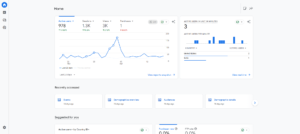
In simple terms, Google Analytics is a web analytics tool that is developed by Google that allows you to track, measure, and analyze your website and app performance in detail. It collects data on user behavior, traffic sources, device usage, geographic locations, and conversion actions. This tool can help you understand how visitors find your website, which pages are performing best, and where users are dropping off during their journey.
Not only that, but Google Analytics can integrate seamlessly with other Google products such as Google Ads, Search Console, and Data Studio, which makes it a powerful tool for performance marketing and reporting.
If we talk about its latest version, GA4, it focuses on event-based tracking, cross-device measurement, and predictive insights powered by machine learning. And because of its free pricing model and scalability, the platform is used by website owners of every size.
Matomo Overview
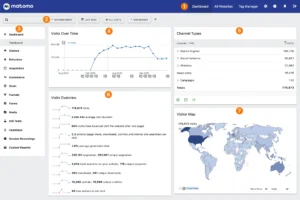
Matomo interface
Matomo is an open-source web analytics platform that is designed to give you complete ownership and control over your website data. Unlike cloud-based analytics tools, Matomo allows you to host analytics data on your own servers or private cloud infrastructure. This makes it especially attractive for organizations with strict data privacy, compliance, and regulatory requirements.
Matomo can track visitor behavior, page views, conversions, traffic sources, and user journeys without relying on data sharing with third parties. It also complies with privacy laws such as GDPR by offering features like cookieless tracking, IP anonymization, and user consent management.
That’s why Matomo is commonly used by government websites and healthcare platforms that prioritize data sovereignty.
Top Features & Benefits of Google Analytics

Advanced Traffic and User Behavior Tracking
Google Analytics provides detailed insights into how visitors are interacting with your website across pages, devices, and sessions. It tracks page views, scroll depth, events, engagement time, and conversion paths in real time. Because of that, you can analyze traffic sources such as organic search, paid ads, referrals, and social media with precision.
Among the reports, behavioral reports are especially useful, which can help you identify high-performing pages, exit points, and content gaps in your website. At the same time, it also supports cross-device tracking, which can help you understand how visitors are moving between mobile and desktop.
Powerful Integration with the Google Ecosystem
One of Google Analytics’ strongest benefits is its seamless integration with other Google tools. It can connect easily with Google Ads, which can play a key role for you to track campaign performance and ROI from clicks to conversions. Integration with Google Search Console can also provide you with keyword-level insights and organic search performance data.
What makes it even better is that Google Analytics can also work with Looker Studio for advanced reporting. These integrations can reduce manual data handling and can create a unified marketing analytics environment for you.
Event-Based Tracking with GA4
GA4 introduced an event-based data model that can track visitors’ interactions more flexibly than traditional session-based analytics. Every interaction, such as clicks, video plays, file downloads, and form submissions, is recorded as an event.
This can help you measure visitor engagement in more meaningful ways. Event-based tracking can also support better cross-platform measurement between websites and mobile apps. This approach can help you understand visitor intent, engagement quality, and micro-conversions more accurately across multiple touchpoints and devices.
Machine Learning and Predictive Insights
Google Analytics uses machine learning to provide predictive metrics and automated insights. Features like predictive revenue, churn probability, and purchase likelihood can significantly help you anticipate user behavior. Automated alerts, on the other hand, can notify you of unusual traffic changes, spikes, and drops without manual monitoring.
These insights can help you act quickly on performance issues. Not only that, but it can also improve data accuracy by filling gaps, which are mainly caused by cookie restrictions or incomplete datasets.
Scalable Reporting for All Business Sizes
Google Analytics is designed to scale from small websites to enterprise-level platforms. It supports custom reports, audience segmentation, and multi-property tracking without performance issues. You can analyze millions of events daily while maintaining fast data processing.
The free version offers extensive functionality, which makes it accessible to everyone. For advanced needs, GA360 can help you get enterprise features like higher data limits and service-level agreements. This scalability ensures Google Analytics remains effective for website owners of all sizes.
Top Features & Benefits of Matomo
Full Data Ownership and Control
Matomo’s biggest advantage is complete data ownership. All analytics data is stored on your own server or private cloud, and will not be shared with any other external platform. This ensures that you have full control over how data from your website is collected, stored, and used.
Unlike third-party analytics tools, Matomo does not even monetize user data. This is especially important for those websites and organizations that are handling sensitive information.
Strong Privacy and Compliance Features
Matomo is built with privacy-first principles, which makes it compliant with regulations such as GDPR, HIPAA, and PECR. It offers cookieless tracking, IP anonymization, and user consent management tools. Because of that, you can customize data retention policies and disable tracking features as required.
These controls can help you meet legal obligations without relying on external compliance tools. The platform’s transparent data practices make it appealing for government and healthcare institutions, where secure data handling is far more important.
Flexible Self-Hosted and Cloud Options
Matomo provides flexibility through both self-hosted and managed cloud deployment options. Self-hosting allows you full customization and infrastructure control, while the cloud version can simplify maintenance and updates.
You can choose based on your technical resources and security requirements. This flexibility also makes Matomo suitable for websites of almost every size. Unlike forced cloud-only solutions, Matomo can adapt to different operational needs.
Customizable Dashboards and Reports
Matomo offers highly customizable dashboards that can allow you to focus on metrics that are most relevant to your goals. Reports can be tailored for traffic analysis, conversions, content performance, and user journeys.
You can also enable custom segments, which can help you deeply analyze specific audiences and their behaviors. You can also export these reports in multiple formats for internal sharing.
Transparent Tracking Without Data Sampling
Matomo can provide accurate analytics without data sampling, which makes sure that every tracked visit and interaction is recorded. This is critical for those who rely on precise metrics for decision-making. It is also worth noticing that there are no hidden thresholds where data accuracy is reduced.
Transparent tracking allows consistent historical comparisons and detailed long-term analysis. You can trust these reported numbers, which reflect actual user behavior.
Pros and Cons of Google Analytics
Pros
Free and Scalable Analytics Platform: Google Analytics offers a powerful free version that supports small websites and large enterprises, allowing traffic growth, advanced tracking, and reporting without mandatory software costs.
Deep Integration with Google Tools: The platform integrates seamlessly with Google Ads, Search Console, and Looker Studio, and can help you get unified marketing insights, accurate attribution modeling, and campaign performance tracking.
Advanced Reporting and Insights: Google Analytics can provide detailed reports on user behavior, traffic sources, engagement metrics, and conversions, which can help you identify trends, optimize funnels, and improve website performance.
Event-Based Tracking in GA4: GA4’s event-driven model can track user interactions like clicks, scrolls, and conversions more flexibly, offering better cross-device measurement and a deeper understanding of engagement.
Strong Machine Learning Capabilities: Built-in machine learning in Google Analytics can generate predictive metrics, anomaly detection, and automated insights, which can help you forecast behavior, identify issues early, and make proactive decisions without heavy manual data analysis efforts.
Cons
Data Ownership and Privacy Concerns: Google Analytics stores data on Google servers, which can raise ownership and privacy concerns for organizations operating under strict regulations.
Learning Curve for Beginners: GA4’s interface and event-based structure can feel complex for beginners, which requires time, documentation, and experimentation before you fully understand these reports.
Sampling and Data Thresholds: In high-traffic environments, Google Analytics may apply data sampling, which can reduce accuracy in reports and make precise analysis challenging.
Limited Customization Without Expertise: Advanced configurations, custom events, and detailed reporting often require technical knowledge and developer support, which makes deeper customization difficult for non-technical users.
Dependence on Google Ecosystem: Businesses that are heavily reliant on Google Analytics may become dependent on Google’s ecosystem, policies, and updates, which can reduce flexibility and increase risk when platform changes affect data access or reporting models.
Also Read This: Best Google Analytics Alternatives
Pros and Cons of Matomo
Pros
Complete Data Ownership: Matomo gives you full ownership of your analytics data by allowing self-hosting, ensuring information is never shared with third parties and remains fully accessible for internal analysis.
Privacy-First Analytics Approach: Designed with privacy in mind, Matomo supports GDPR compliance, cookieless tracking, IP anonymization, and consent management, which makes it suitable for organizations that prioritize ethical data collection practices.
No Data Sampling: Matomo tracks every visit and interaction without sampling, which helps you get accurate metrics, consistent historical comparisons, and reliable reporting.
Flexible Deployment Options: You can choose between self-hosted or cloud-hosted Matomo setups, which allows organizations to balance control, security, maintenance effort, and scalability based on internal technical resources and compliance needs.
Customizable Reporting and Dashboards: Matomo offers fully customizable dashboards, reports, and segmentation tools, which can help teams to focus on specific KPIs, audience behavior, and performance metrics aligned with unique business objectives.
Cons
Higher Setup and Maintenance Effort: Self-hosted Matomo requires server management, updates, backups, and security monitoring, which can increase workload and technical responsibility compared to fully managed analytics platforms like Google Analytics.
Paid Features for Advanced Use: Many advanced features, such as heatmaps, session recordings, and funnels on Matomo, require paid add-ons, which can increase overall costs.
Smaller Ecosystem and Community: Matomo has a smaller user base and developer ecosystem, which means you’ll get fewer tutorials, community resources, and third-party tools compared to more widely adopted Google Analytics.
Less Automated Intelligence: Matomo lacks advanced machine learning and predictive insights, and requires more manual analysis and interpretation compared to Google Analytics.
Google Analytics vs Matomo: Which is Better?
Choosing between Google Analytics and Matomo depends on your priorities rather than feature volume alone. Google Analytics is ideal for those who are looking for accurate insights, deep marketing integrations, and advanced predictive analytics with minimal upfront cost. That’s why it mainly suits e-commerce stores and websites that are comfortable with cloud-based data storage.
Matomo, on the other hand, is better suited for organizations that prioritize data ownership and privacy compliance. Government institutions, healthcare platforms, and privacy-conscious companies benefit the most from Matomo’s self-hosted control and non-sampled data accuracy.
Conclusion
Both Google Analytics and Matomo are powerful analytics tools, but they serve different business needs, and understanding these needs can help you choose the right tool for your website’s audience tracking. Ultimately, the right choice depends on your priorities.
It’s also worth keeping in mind that every website has its own unique measures while tracking analytics, so there is no single “best” platform. One can work for the other, but mit ight not be the best for you.
That’s why, above, we’ve mentioned all the necessary information, so you can be sure which tool can best serve your needs.
FAQ’s
- Is Google Analytics free to use?
Yes, Google Analytics offers a powerful free version, which can be enough for most users, while enterprise-level features are available through GA360, which is paid.
- Can Matomo work without cookies?
Yes, Matomo can work with cookieless tracking.
- Which tool is better for small websites?
Google Analytics is easier for small websites because of free access, simple setup, and minimal technical requirements.
- Does Matomo support e-commerce tracking?
Yes, Matomo can provide detailed e-commerce tracking, including product views, cart actions, and conversions.